Enterprise Data Platform — Architecture & Capabilities

SymmetricDS supports data replication, multi-primary replication, filtered synchronization, and transformations. Using web and database technologies, it can replicate data asynchronously as a scheduled or near real-time operation. Designed to scale to a large number of databases and operate between different platforms, it works across low-bandwidth connections and can withstand periods of network outage.

SymmetricDS is an enterprise data platform built on four core capability areas: Real-Time Data Streaming for continuous change data capture and delivery; Data Movement for large-scale loads and migrations; Data Integration for connecting 80+ sources and targets; and Data Transformation for filtering, enriching, and mapping data through pipelines. Data Quality and Data Governance are on the active roadmap.

SymmetricDS Architecture

Architecture

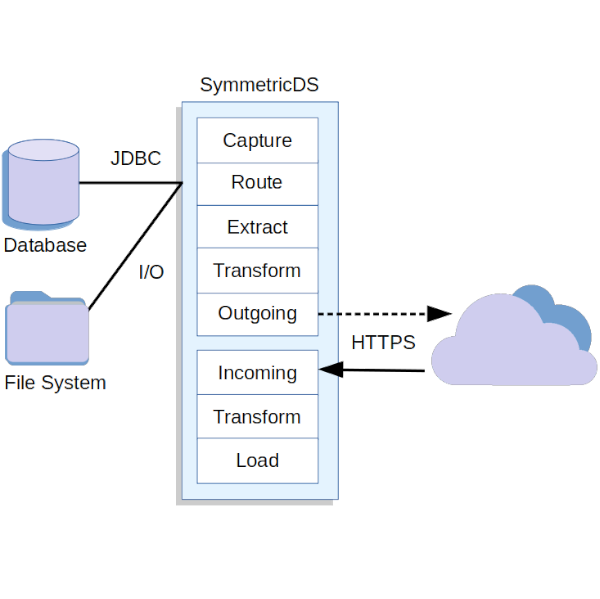
Change data capture for tables uses database triggers that fire and record changes into an event table. SymmetricDS Pro includes additional capture methods, including log mining, change tracking, and logical streams. For file sync, a similar mechanism is used, except changes to the metadata about files are captured. The changes are recorded as insert, update, and delete event types. Triggers are installed and maintained on tables based on the configuration provided by the user, and schema changes are automatically detected and adjusted.

Routers run across new changes to determine which target databases will receive them. The user configures which routers to use and what criteria is used to match data, creating subsets of rows if required. Transformations operate on the change data either during the extract phase at the source or the load phase at the target.

Core Features

  • Cross Platform – Runs on most operating systems and can sync any database to any database supported.
  • File Sync – Sync files over the same HTTP/S data sync communication.
  • Multi-Threaded – Multi-threaded architecture extracts, transfers, and loads data in parallel.
  • Channels – Tables are grouped into independent channels that have their own thread queue for synchronization.
  • Automatic Recovery – Streaming and movement pipelines recover automatically from network outage. Changes are queued and retried until every record reaches its destination.
  • Transaction Aware – Data changes are captured and replayed in transactional order, guaranteeing consistency across all connected systems in the integration layer.
  • Multi-Primary – The same table can be synchronized between two or more databases while avoiding update loops.
  • Transformation – Filter, subset, and transform data during the extract or load phases.
  • Conflict Detection – Multi-primary and bidirectional streaming environments detect and resolve conflicts automatically, with no duplication and no data loss.
  • Table Schema – Optionally allow creating and altering of database schema.
  • Initial Data Load – Prepare a remote database with an initial load of data, or use partial loads of specific tables and rows.
  • Data Transformation Pipelines – Data Transformation pipelines (v3.17) let you filter, subset, and enrich data as it moves, delivering the right data to the right target in the right shape.

Pro Features

  • Web Console – Web interface for configuration, management, and monitoring of all nodes from a central console.
  • Clustering – Deploy a node on multiple servers behind a load balancer for highly available replication.
  • Bulk Loaders – Speed up the initial load with native bulk loaders that use a direct path to the database.
  • More Connectors – Connect to more endpoints with additional replication modes like log mining and change tracking.
  • Compare and Repair – Validate data after a migration or schedule a comparison with the option to repair data.
  • Security – Enhance security with encrypted resources, RBAC, ACL, 2FA, SSO, and event logging.
  • Mobile Platforms – Deploy to Android, iOS, and other mobile devices.
  • Monitoring – Monitor and receive notification for problems like errors and backlogs.
  • Insights – Optimize performance with insights that recommend settings to adjust.
  • Remote Management – Manage through command line tools, REST API, and JMX.

Learn more about Jumpmind’s SymmetricDS Pro.

Popular Connectors

  • Amazon Redshift logo   Amazon Redshift
  • Amazon S3 cloud storage logo   Amazon S3
  • Apache Kafka streaming platform logo   Apache Kafka
  • IBM Db2 database logo   DB2
  • Elasticsearch search and analytics engine logo   Elasticsearch
  • Google BigQuery data warehouse logo   Google BigQuery
  • MariaDB database logo   MariaDB
  • MongoDB document database logo   MongoDB
  • MySQL database logo   MySQL
  • Oracle database logo   Oracle
  • PostgreSQL database logo   PostgreSQL
  • Snowflake cloud data warehouse logo   Snowflake
  • Microsoft SQL Server logo   SQL Server
  • SQLite embedded database logo   SQLite
  • SAP Sybase database logo   Sybase ASE
Data replication icon showing a computer syncing data to a cloud and database server

Flexible Data Replication

A powerful set of features for data replication give you flexibility to meet project requirements. Synchronize data across nodes on remote networks with low bandwidth usage and automatically handle periods of disconnected operation.

With asynchronous replication in the background and an efficient communication protocol, SymmetricDS guarantees replication by using transactions and tracking data with acknowledgements. Recovery from errors is automated through retry attempts and conflict resolution to overcome database errors. Data can be synchronized in one direction or both directions in a multi-master configuration.

You configure the nodes, groups, and how network connections are established. Push data at a short interval for real time integration or pull data periodically to work through firewalls and reduce connection overhead.

File synchronization icon showing files being synced across multiple computers in a network

File Synchronization

Copy files and folders in both directions between multiple nodes using a single mechanism for all your data replication. Run synchronization continuously or periodically, either syncing immediately or batching file synchronization during a quiet period.

Configure a base directory and specify whether to include sub-directories, then configure filtering for which files and folders should be synced. Withstand periods of downtime and allow the synchronization to continue when the network is available. Customize the synchronization with your own scripts that run during file sync events.

Cross-platform compatibility icon showing a database connecting to Windows, Mac, Linux, and Android operating systems

Cross Platform

SymmetricDS can run on most platforms, from servers to laptops to mobile devices, and replicate from any database to any database, whether they are located on-premise, across a wide area network, or in the cloud. Based on the Java runtime, SymmetricDS can run on most operating systems, including Windows, Linux, Unix, Mac OS X, Android, and many others. For mobile devices like iOS and embedded systems, a minimal C-based client can handle the same core replication protocol.

SymmetricDS can replicate different databases together, so you can run SQLite on your mobile device, MySQL on the back office, and Oracle at the central office, all of them syncing data with each other. With support for most major database platforms, you can choose a database that is best suited to the application, and seamlessly integrate into a heterogeneous enterprise. Avoid vendor lock and gain the freedom of database independence.

Scaling and performance icon showing databases multiplying to represent horizontal scaling and high-performance data replication

Scaling and Performance

From two databases to several thousand databases, SymmetricDS is optimized to replicate data quickly and handle a large number of synchronization requests. By using web server technology, many simultaneous requests from remote databases can be handled to sync data to a central deployment. A multi-threaded architecture is key to maximum performance of replication. By assigning tables to channels, data can flow using separate threads to load data in parallel. In addition, each channel uses separate threads for extract, transfer, and loading of data.

To handle more clients and improve availability of a central database, clustering allows for multiple instances of SymmetricDS to connect to the same database. Large networks of databases can be grouped into tiers for more control and efficiency, with each group syncing data to the next tier in an efficient multi-tier architecture.

Data filtering, subsetting, and transformation icon showing rows being selectively extracted and transformed from a data table

Filter, Subset, Transform

With data integration features, you can manipulate the change data with filters, subsets, and transformations. Filter or encrypt sensitive data before it loads into the operational database, or publish it to a protected database instead. Subset data either horizontally, by selecting which rows go to a destination, or vertically, by selecting which columns to sync.

Map columns from the source database to different columns on the destination. Data can be transformed, merged, and enriched during both the extraction phase on the source and the load phase on the destination. Use built-in transforms for quick manipulation or plug in a custom Beanshell script for even more power.

Conflict detection and resolution icon showing databases with conflicting data being identified and resolved automatically

Conflict Detection and Resolution

When two or more nodes are involved in data synchronization, the system can detect change conflicts and resolve them so data remains consistent across nodes. Configure rules to detect a conflict and specify how to resolve it automatically or manually.

Detectors can be configured at the table, channel, or node group level to watch for conflicts based on primary keys, change data, timestamps, or versions. Resolvers can automatically merge data or choose the winning change based on node group or timestamp. Use the Java API to implement a resolver with custom behavior. Or use the manual resolver to view data change conflicts and select the resolved data.

Get Started Quickly

View our Quick-Start tutorial or start with 
our User Guide.

Need enterprise support, advanced features, or a hosted option?

Schedule a Demo